One scan per weekend doesn't scale
A season of weekends is eleven scans on any tool, ours included. The difference is whether you build and fix them one at a time, or all at once.
You want a site at one campground, any weekend this autumn. That isn't one scan. It's eleven.
Every tool that watches campsite availability works this way, ours included, and the next section is about why. What differs is what those eleven cost you. On most, you build them from the ground up, one Friday at a time. Campnab goes further: each scan carries a Copy button, so you can duplicate one and change the dates ("you can duplicate a scan… find the scan you wish to duplicate and click the Copy button within it")1. That genuinely helps. But it's still ten trips through the same dialog.
Then comes the part nobody warns you about: the day you realize you picked the wrong loop, or set the length for the tow vehicle instead of the whole rig, and eleven scans have to be opened and fixed one at a time.
Setup is the annoyance people notice. Maintenance is the one that actually costs you.
Why one scan can't cover a season
This isn't a limitation anyone chose. It falls out of how availability works.
A campsite is either free on a given night or it isn't, and those facts are independent. Site 191 being released for the 4th tells you nothing about the 11th: different reservation, different party, different cancellation. So a scan has to name the nights it cares about, because "is this available?" is only a well-formed question once you've said when.
"Flexible dates" is the usual answer, and it's a good feature that solves a different problem. It widens the check-in date across a continuous run of days while keeping the stay length fixed. Campnab's version reaches seven days: "Our Flexible Dates feature expands the number of arrival dates you can monitor within one scan to a total of 7 days"1.
Seven continuous days is exactly right for one trip that could move. It is not a season. Eleven Friday-to-Sunday weekends spread from September to November aren't a window. They're eleven separate two-night questions with four days you don't want in between, and no amount of widening a single window covers them without dragging in every Tuesday along the way.
The shaded column is everything one seven-day window can reach: the first weekend, and the start of the second. The other nine need their own dates.
So on any tool built this way, a season means a scan per weekend, and most tools price or cap that. Campnab's memberships run from 3 concurrent scans on the lowest tier to 30 on the highest1, and Arvie's Pro plan allows "20 cancellation scans at once"2. Not everyone charges for it: Campflare bills itself as "the free camping app" with "no paywalls" and publishes no scan cap at all3. Recreation.gov's own free alerts are stricter still: "only 3 alerts can be set at one time"4, which is three weekends, and a good reason the free option runs out for this particular job even though it's the right answer for a single trip.
The question isn't whether you need several scans. You do. It's how much of your evening it costs to make them, and what happens when they all turn out to be subtly wrong.
Get one scan right first
Everything downstream is a copy of this scan, mistakes included. It's worth ten minutes.
Pick the campground, load your rig profile so the filters start from what you actually tow, set the filters you want, and most importantly, check that the live match count shows a sensible number of real sites rather than zero. Then set the dates for the first weekend of the run.
That's the whole of the previous post, so rather than repeat it: setting up a campsite scan that actually matches your rig covers what each filter excludes and why the match count is the thing to watch.
Get that one scan into a state where you'd be happy if it fired tonight. Then copy it.
Copy it across the season
Repeat takes the scan you just built and generates dated copies of it across a range you choose.
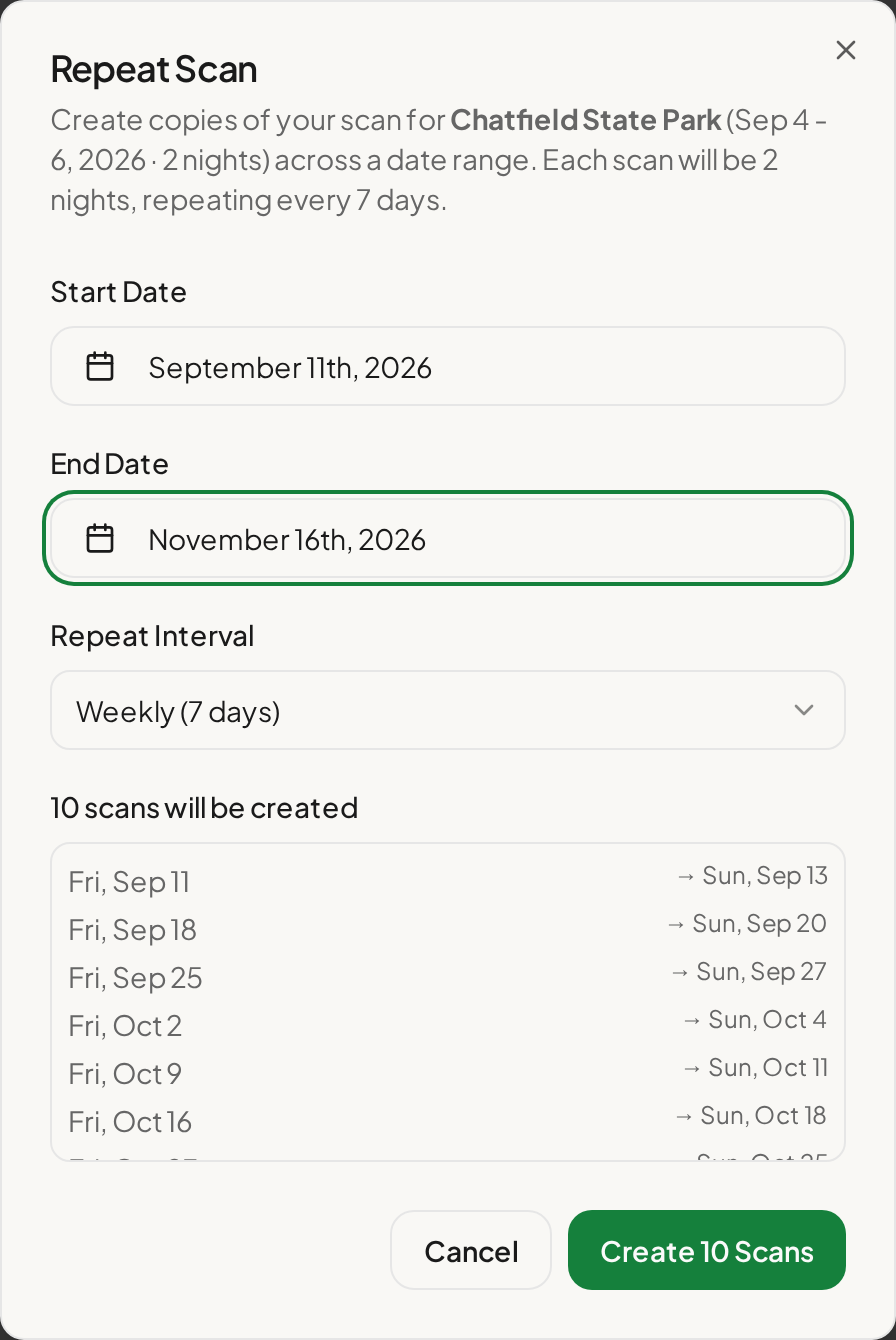
You give it three things (a start date, an end date and an interval) and it shows you exactly what it's about to create before it creates anything:
 Full size(opens in a new tab)
Ten new scans, plus the one you already built: eleven weekends. Weekly is the obvious interval for weekends, but it isn't the only one: 3, 10, 14 and 30 days are also available, for trips that repeat every two weeks or every month rather than every Friday.
The preview matters more than it appears to. It lists every weekend it will generate, with the check-out date worked out for you, and the button carries the count. If the interval or the end date is wrong, you find that out here rather than by counting rows afterwards.
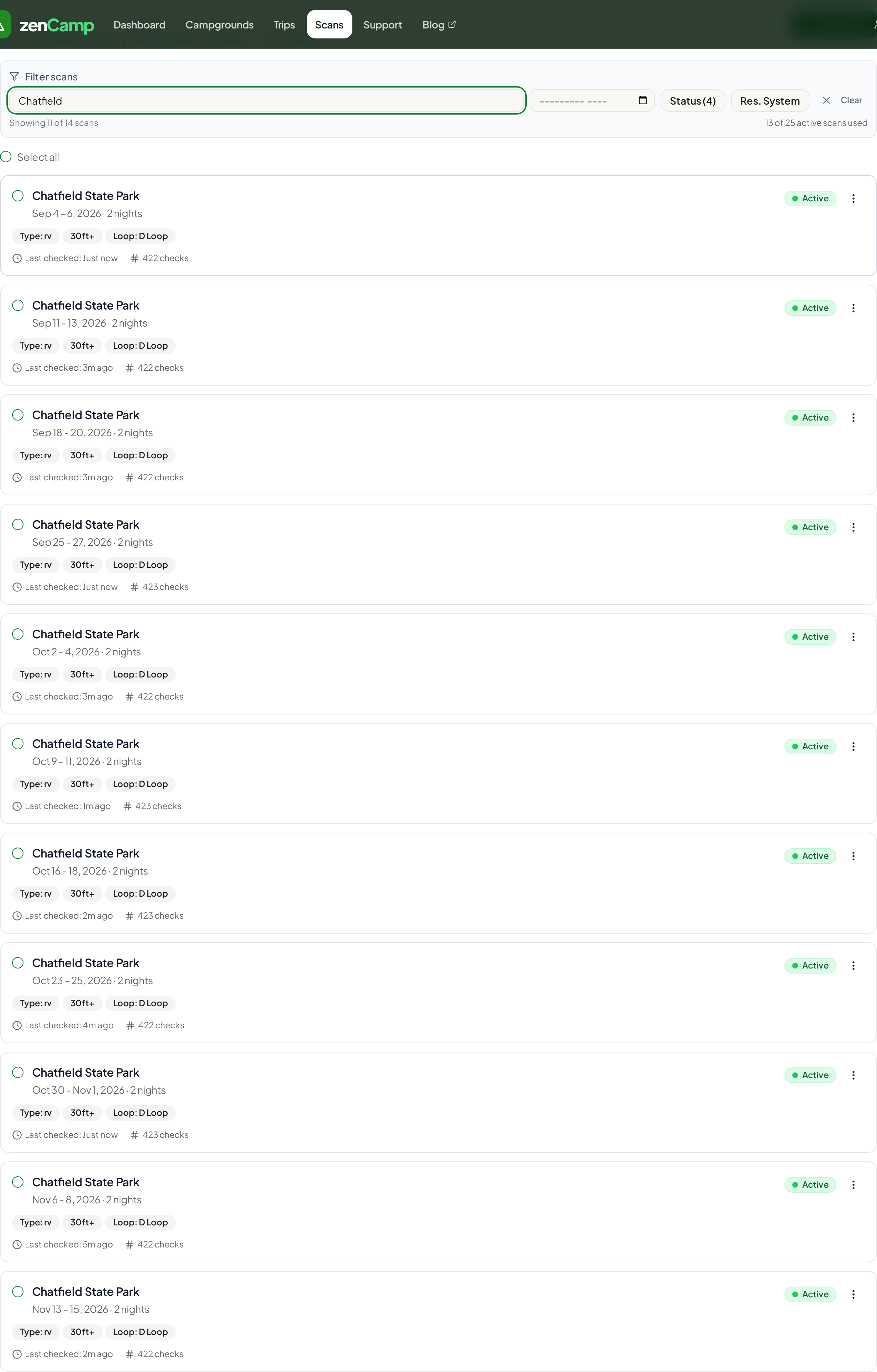
What comes out the other side is a set of ordinary scans:
 Full size(opens in a new tab)
That's a deliberate design choice worth explaining, because a recurring rule would have been easier to build. Each weekend is a genuinely separate scan: its own dates, its own status, its own history of checks. You can pause the one weekend you now can't make without touching the other ten. A single recurring rule would have needed invented semantics for "this occurrence matched but that one didn't," and the first time you wanted to drop one weekend you'd have been fighting it.
Fixing a mistake across all of them
This is the day it earns its place. Three weekends in, you notice the scans are set to a 30-foot minimum and your trailer plus tow vehicle needs 35. Every one of those scans is now asking the wrong question.
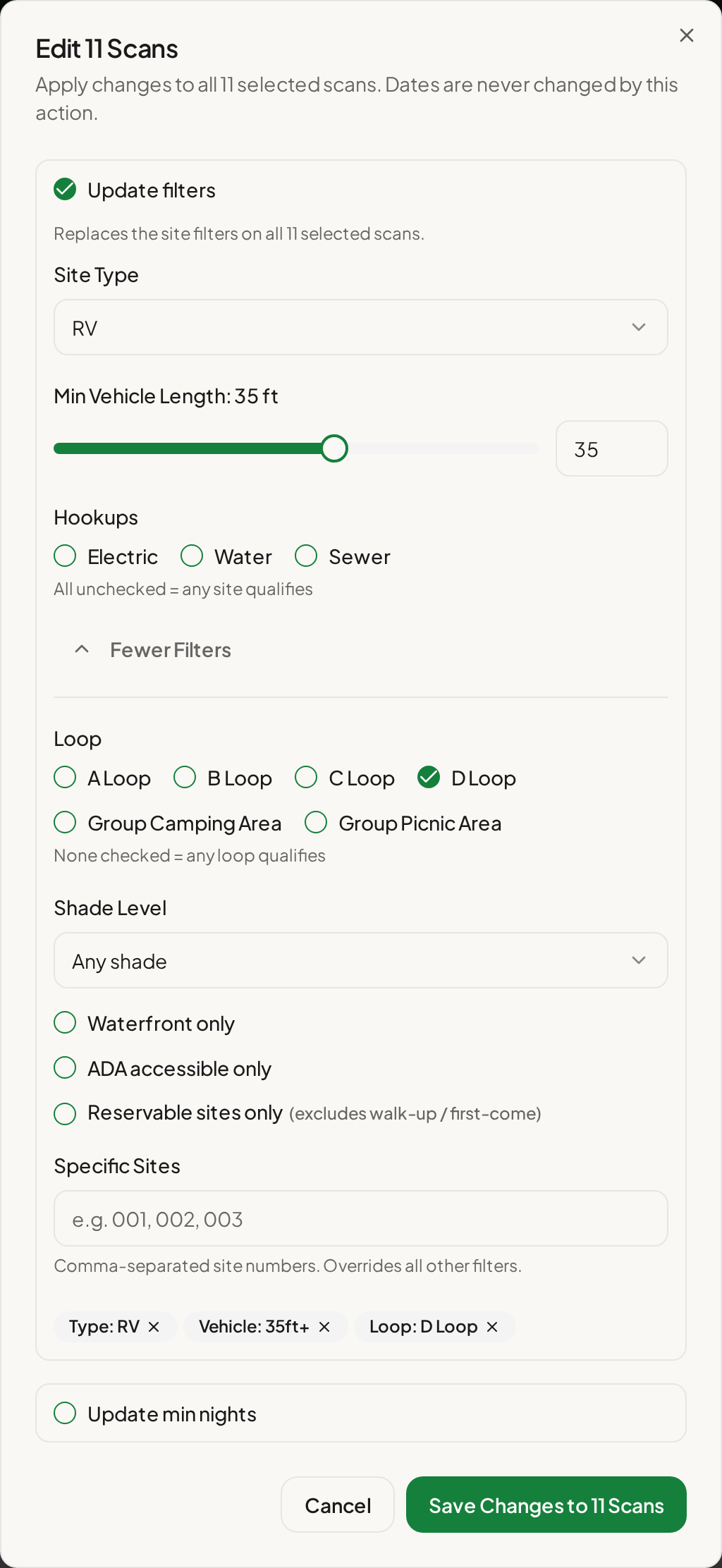
Select them and set the filters once:
 Full size(opens in a new tab)
Two things on that dialog are worth reading carefully.
The first is "Dates are never changed by this action." Bulk editing deliberately can't touch dates, and that's the point: the one field that must stay different on every scan is the one the series exists to vary.
The second is the warning that it replaces the site filters on all the selected scans, rather than amending them. This is the one place it can bite you, and it's worth being blunt about: you are specifying the new filter set in full, so anything you don't set here is cleared everywhere. If those eleven scans had a loop filter and you bulk-edit only the length, the loop filter goes. That's why the screenshot above restates site type and D Loop alongside the 35-foot change: the length is the only thing being changed, but everything being kept has to be named too.
It's another argument for getting the first scan right before you copy it. Re-specifying four filters across a selection is fine; reconstructing from memory what eleven scans used to be set to is not.
This is the half of the problem copying doesn't solve. Campnab's FAQ documents the per-scan Copy button above, but no way to change a filter across several scans at once1. Building the series is the easier half. It's the correction three weekends later that decides whether running a season is worth it.
Site exclusions don't need the selection at all: ruling a site out once covers every scan at that campground, the ten copies included, and any you create later.
The dialog also drops what it can't sensibly offer. Select scans spanning several campgrounds and the loop and specific-site filters disappear, with a note saying so. "D Loop" means nothing when half the selection is at a different park.
The same selection drives the blunter operations (pause, resume, archive, delete), which is how you retire a season once the weather turns, rather than deleting eleven things one at a time.
What a season costs you
Worth doing the arithmetic before you build, because scans aren't unlimited, and the unit is the scan, not the campground. Eleven weekends at one campground is eleven of them.
| Active scans | |
|---|---|
| Eleven autumn weekends at one campground | 11 |
| A flexible-window trip elsewhere | 1 |
| One specific site you're still chasing | 1 |
| Total against an Explorer plan's 25 | 13 |
That's the figure in the dashboard screenshot above: 13 of 25 active scans used, with a paused scan at another campground not counted.
The release valve is that paused and archived scans don't count. Everything else does, including a scan that's holding a site in your cart. So the honest way to run a long season is to keep the next six or eight weekends active and leave the later ones paused until you're closer to them. It costs nothing, and it keeps the dashboard readable.
The cancellation rules point the same way. On Recreation.gov, a standard campsite booking can be cancelled for a $10 fee right up until the day before arrival; cancel after midnight local time that day and you forfeit the first night's fees as well5. Nothing pushes a hesitant camper to give a site up months ahead, so the weekends worth watching hardest are the ones closest to you. Note that the 14-day deadlines on the same page cover cabins, yurts and group facilities, not standard sites, and state systems set their own rules, so check the campground you are actually watching.
If you're only ever chasing one trip at a time, none of this applies and a much smaller plan is the right call. Pricing has the tiers as they'll compare when the paid plans launch.
Then the site opens
Everything above is about asking the right question on the right dates, repeatedly, without losing an evening to it.
None of it changes what happens next. When one of those weekends finally frees up, that site goes to whoever completes the cart step first, and everyone else watching those dates was told at the same moment you were. That's a different problem with a different answer: cart holds vs. availability alerts. It's also worth knowing that a site someone gives up may not reappear immediately, which is why a sold-out campground can sit half empty.
Sources
-
Campnab FAQ (opens in a new tab), retrieved August 30, 2026. ↩ ↩2 ↩3 ↩4 ↩5
-
Arvie (opens in a new tab), retrieved September 1, 2026. ↩
-
Campflare (opens in a new tab), retrieved September 1, 2026. ↩
-
Recreation.gov Help Center, camping availability alerts (opens in a new tab), retrieved August 30, 2026. ↩
-
Recreation.gov Rules and Reservation Policies (opens in a new tab), retrieved September 1, 2026. ↩