Recreation.gov availability alerts: what they do and don't do
Recreation.gov's free availability alerts email you when a cancelled campsite matches. What they can't do, and why the site can be gone when you click.

You set an alert, the email arrived, you clicked View and Book Campsite within a minute, and Recreation.gov told you the site was already reserved. The alert worked. The site was still gone.
Yes, Recreation.gov has its own cancellation alerts, and for a lot of trips they're worth setting up. They also have limits that aren't obvious until one of them costs you a site. Recreation.gov's own Help Center explains most of them if you read it closely, and this post collects what it says.
What Recreation.gov's availability alerts do
An availability alert is a saved search that emails you. In Recreation.gov's words, it "will send an availability notification to the email address associated with your Recreation.gov account when a campsite within the campground of choice that matches your alert preferences becomes available after another visitor cancels a reservation"1.
Setting one takes a minute:
- Log in, open the campground's page and choose to set an alert.
- Pick your dates. If you can shift them, select My Start Date is Flexible (+/- 3 days).
- Add filters if they matter: hookups, equipment type, group size and similar.
- Save the alert.
You manage alerts from the Availability Alerts tab in your account. Expired ones move to an inactive list. One catch worth knowing early: "filters cannot be adjusted after an alert is created – to change a filter, you have to recreate a new alert." The Help Center article (opens in a new tab) has the step-by-step with screenshots.
Four limits worth knowing before you rely on one
1. It watches a campground, not a site. "Your alert settings are not specific to an individual campsite." Filters narrow which sites count as a match, but you can't point an alert at site 42 and nothing else. If the reason you want this campground is one particular site, the alert will also fire for every other site that matches your filters.
2. Three at a time. "Each account can store up to three active alerts at a time." That's three campgrounds, three date ranges at one campground, or any mix.
3. Email only. "Opt-in text message alerts are not available at this time." The Help Center says setting alerts from the mobile app is coming, "with notifications sent via email." As of this writing there's no text or push option.
4. Cancellations, not release day. Asked whether you'll get a notification when a campground opens for the season, the Help Center answers: "No, availability alerts are only sent when an active campsite reservation is released." An alert covers sites that someone booked and then gave up. It stays silent on the morning new dates go on sale (more on that below).
Why the site is already gone when you click
The site is gone because the email didn't go only to you. Recreation.gov is direct about it (opens in a new tab): an alert "does not guarantee you a reservation as this alert will be sent to everyone who has the alerts set for the same date." Its own FAQ even poses the question everyone asks: "I jumped on the alert right away, but it was already reserved. How is that possible?"
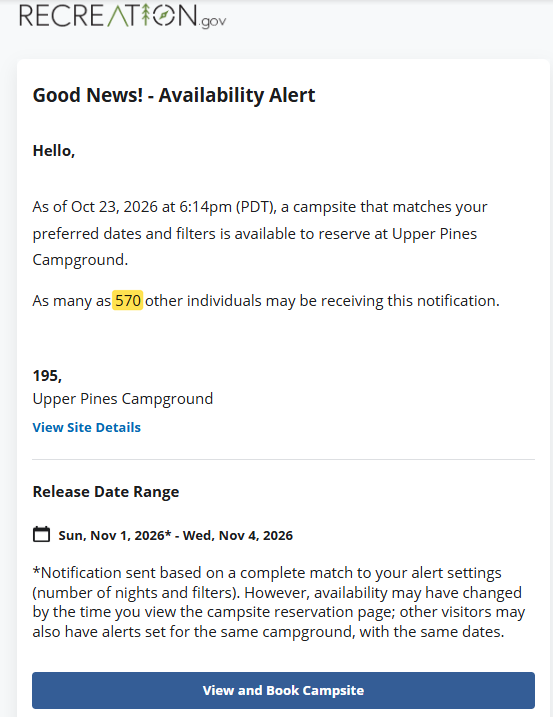
What's less widely known is that the email tells you how big the race is. "The notification email will tell you how many other potential visitors received the same update." Here's one we received for a site at Upper Pines in Yosemite Valley:
 Full size(opens in a new tab)
Recreation.gov's wording is "as many as," so 570 is an upper limit, not a count of people who clicked. It's also one alert at a Yosemite Valley campground, not a typical figure. But it shows the shape of the problem. Nothing is held when the email goes out. A site is locked "in your cart for 15 minutes" only once someone clicks Add to Cart2, and only the first person to click gets that lock. Everyone who clicks after that finds it unavailable.
A faster alert would help a little, but it wouldn't change the basic problem. Recreation.gov doesn't say how quickly alerts go out, only that they're sent "after availability is determined," and we don't know either. Whatever the delivery time, when hundreds of people at a popular campground may get the same email, the gap between your click and everyone else's decides who gets the site. That's the footrace to the cart.
When the free alert is enough
If your dates can move and you'd take any of several sites, especially on a weekend that isn't a holiday, Recreation.gov's alert is usually all you need. Catching more cancellations beats racing harder for one, and if three alerts cover your trips, you shouldn't pay anyone for that.
A few things make it work better:
- Select the flexible-date box when you can. Plus or minus three days gives you a lot more cancellations to catch.
- Spend your three alerts on the trips that matter. They cost nothing, but you only get three.
- Be ready to click. Stay logged in on the device you'll click from, so you aren't stopped at a sign-in screen. Have your payment details ready too, so checkout is quick once the site is held. If the cart timer is about to run out, Recreation.gov offers to Add Five Minutes.
- Keep your account email current. Alerts go to the address that was on your account when you set them. If you change it, the Help Center says to delete your upcoming alerts and create them again.
When the free alert isn't enough
The free alert struggles in three situations: when one specific site is the reason for the trip, when the dates can't move, and when a matching email may go to hundreds of people at a popular campground. Two things change the outcome there. The first is targeting the site you actually want, not the whole campground. The second is having the site held for you, not just being told about it.
zenCamp does both. You connect your own Recreation.gov account and set up a scan for a specific site or for flexible criteria. That means trusting zenCamp with access to that account. Filters only help if they describe what you actually need; there's more on that in setting up a scan that matches your rig. When a match opens, zenCamp places a cart hold in your cart and lets you know by email, Telegram or push notification (SMS is coming soon). Recreation.gov's 15-minute lock then applies to you, and zenCamp extends it once, to about 30 minutes in total. You look at the site, decide, and complete the booking yourself. If you don't book, the hold ends and the site goes back to Recreation.gov for everyone else.
How the options compare
Third-party alert services improve on Recreation.gov's alerts in some ways, with more channels and sometimes per-site targeting, but they're alerts too. Here's how they compare with zenCamp:
| Recreation.gov alert | Third-party alert | zenCamp | |
|---|---|---|---|
| Cost | Free | Free or paid | 14-day free trial |
| One specific site | No | Varies | Yes |
| How you hear | Email, SMS or push | Email, Telegram, push or SMS (soon) | |
| Needs a Recreation.gov account | Yes | Usually no | Yes, connected to zenCamp |
| Holds the site | No | No | Yes |
A hold doesn't take you out of the race. zenCamp still has to get the site into your cart before anyone else does, and at the busiest campgrounds it won't always manage it. No tool, ours included, can promise a site at a campground where more people want one than there are sites. What a hold changes is what happens when you do get there first: you decide with the site already in your cart, not while everyone else who got the same email may be clicking the same link.
Plan for release day, not just cancellations
For a peak weekend, release morning is the one to plan for, since most sites are still open. Cancellation alerts don't cover it, but zenCamp's release-window scanning is an upcoming feature. Most Recreation.gov campgrounds release dates six months ahead of arrival2, so May arrival dates go on sale day by day through November. (Yosemite Valley's campgrounds, Upper Pines included, release differently; the guide below covers that.)
So this is a good time of year to pick next season's must-have weekends and put their release dates in your calendar. Set alerts (or scans) for the cancellations after that. Our guide to Recreation.gov release windows covers how the window works, how to find each campground's release time, and the start-midweek strategy for holiday weekends.
Before your next alert
Set your alerts, know the four limits, read the line that says how many other people may have the same email, and plan release day separately.
Sources
-
Recreation.gov Help Center, camping availability alerts (opens in a new tab), retrieved October 23, 2026. ↩
-
Recreation.gov, "Tips for making campsite reservations at popular locations" (opens in a new tab), retrieved October 23, 2026. ↩ ↩2