Setting up a campsite scan that actually matches your rig
Most campsite alerts fire for sites you could never use. How filtering by rig, length and loop works, and the one number that tells you a scan will fire.
You set the alert. It fired. The site was a 20-foot pull-in with a tent pad, and you tow a 30-foot trailer.
The second time it happened you started ignoring the alerts, which is the worst outcome. You're now paying attention to nothing, and the one that mattered went past unread.
An alert is only as good as the question it asks. Most of the work in setting one up is telling it which sites you could actually use, and the awkward part is that tightening that question too far fails silently. There's no error. You just never hear anything again.
Start from the campground, not a blank form
Most scans aren't for a campground you just discovered. They're for one of the four or five you keep going back to.
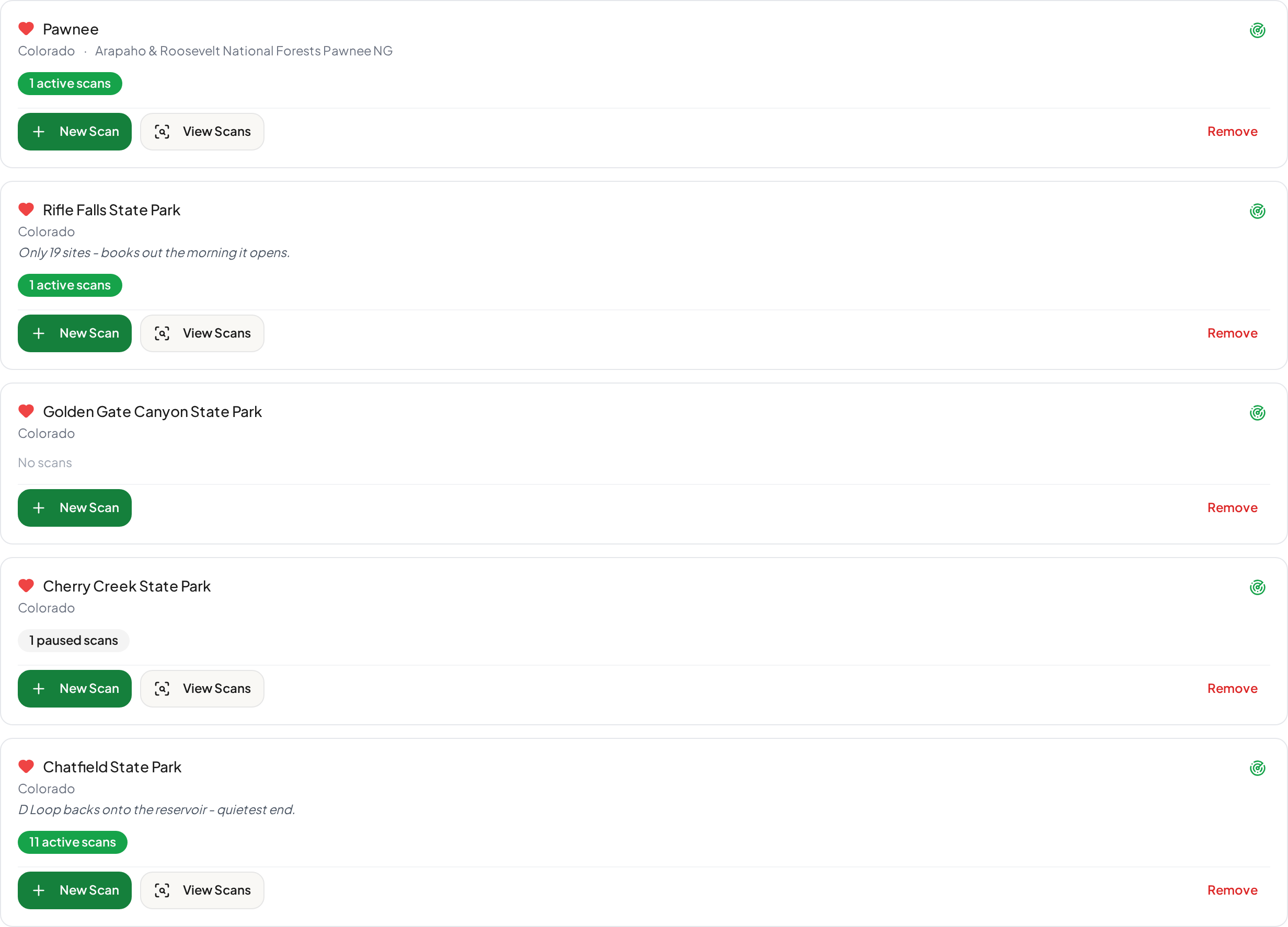
Saving those is the difference between a two-minute setup and a twenty-second one. A saved campground carries your own notes (which loop you rate, how fast the place books out) and any specific site numbers you've marked before, so the next scan starts half-built instead of empty.
 Full size(opens in a new tab)
It also gives you an honest picture of where your attention is going. Eleven scans on one state park, one apiece on two others, one paused and one campground with nothing at all. That's worth knowing before you add a twelfth.
Tell it about your rig once
Your rig doesn't change between trips. Re-entering it does, usually by getting it wrong on the fourth scan at 11pm.
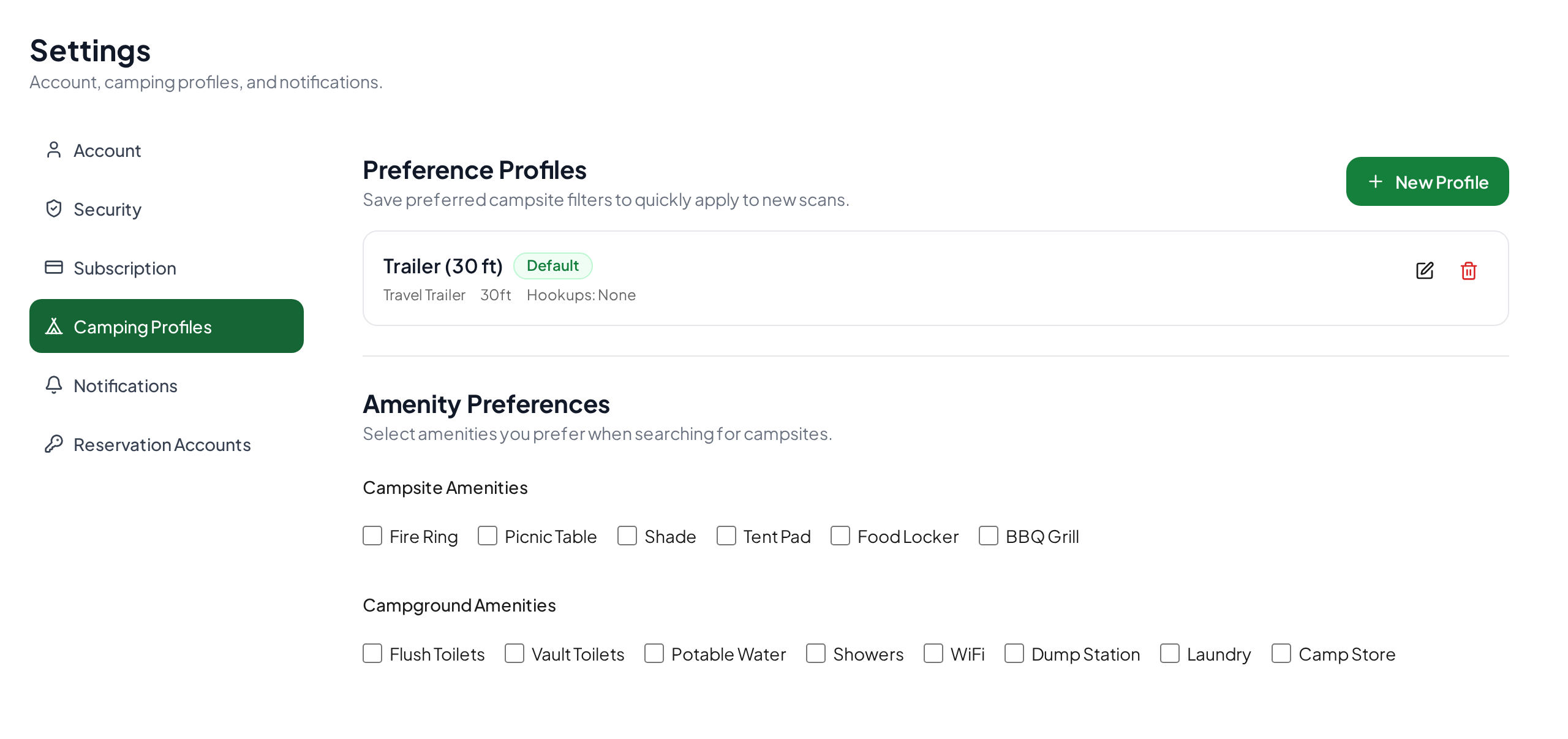
A rig profile stores the constraints that hold for every trip you take: what you're towing or driving, and how long it is. Set it once, mark it as the default, and you can load it into any new scan instead of retyping it.
 Full size(opens in a new tab)
Look again at that word: the profile loads into a scan. It fills the filters in; it doesn't lock them. Anything can be overridden per scan, because "usually true" isn't "always true." The 30-foot trailer stays home the weekend you borrow a tent.
Which is the argument for keeping more than one. The common case is a household that tows most of the time and tent camps occasionally: a trailer profile and a tent profile, each carrying its own rig type, length and hookup defaults, with whichever you use most marked as the default. Loading the right one at the start is faster than editing the wrong one into shape, and it's one less thing to get wrong at 11pm.
There's a related design decision worth naming, because it's the kind of thing that quietly ruins a scan. When you pick a different campground mid-setup, the loaded filters reset rather than following you across. A preference carried silently from one campground to another is an exclusion you didn't make and can't see, and those are exactly the ones that produce a scan that never fires.
Every filter is an exclusion
It's easy to read a filter panel as a wish list. It isn't. Each filter is a rule for throwing sites away.
| Filter | What it throws away |
|---|---|
| Site type | Everything that isn't RV, standard or tent, depending on what you pick. Sites with no type recorded are kept |
| Minimum vehicle length | Sites whose published length is shorter than your rig. Sites with no length recorded are kept |
| Hookups | Sites without the hookup you named, plus every site where the campground records no hookup information at all |
| Loop | Every loop except the ones you named |
| Shade | Sites recorded with a different shade level. Sites with no shade recorded are kept |
| Waterfront, accessible | Sites not carrying that attribute |
| Reservable only | Walk-up and first-come sites you couldn't book anyway |
| Specific site numbers | Everything except the sites you listed |
| Excluded sites | Sites you've ruled out at this campground before, applied to every scan there until you un-exclude them |
Those rows don't all follow the same rule, and that's deliberate rather than an oversight. It's worth understanding, because it's the difference between a filter that quietly widens your search and one that quietly closes it.
Length, shade and site type are tolerant of missing data. A site that doesn't publish a length is kept when you set a minimum length, on the grounds that "unknown" isn't the same as "too small." Shade and site type work the same way: recorded as unknown, the site stays in.
Hookups are not. If a campground records no hookup information for a site, that site is treated as having no hookups and is dropped the moment you ask for electric. The reasoning is that a campsite with an empty hookup list is usually a site without hookups. But where a campground simply doesn't publish the data, a hookup filter can take your match count to zero without a single site actually being unsuitable. It's the filter to reach for last, and the first one to remove when a scan goes quiet.
Some of these you can set before you've ever seen the place. Vehicle length and site type are facts about you and your rig: true at a park you know well and true at one you've never heard of, and the right things to set on day one. (Hookups belong in that group too, which is exactly why the coverage problem above is worth knowing before you use that filter.)
Loop, specific site numbers and exclusions are facts about the park, and there's no honest way to know them up front. Nobody plans a first trip somewhere by studying every site number in a campground they've never visited, and it would be a strange way to spend an evening. You learn that D Loop backs onto the reservoir by going. You learn a site sits beside the toilet block by being offered it and saying no.
That's what the exclusion list is for, and why it isn't a filter you set so much as one you accumulate. Ruling a site out is permanent for that campground rather than for one scan, so it applies to every scan you run there, including ones you create months later. Start with the facts about your rig, leave the park-specific filters alone until you've earned them, and the scan sharpens itself as you use it. There's a separate post on what to do when you don't know enough to filter: the loop of holding a site, looking it up, and ruling it out.
Filtering isn't a capability anyone here invented. Recreation.gov's own free availability alerts do it too. Their Help Center is explicit that "while alerts cannot be set for a specific site, utilizing the filter options that are provided will allow you to get a notification for any site that matches your preferred alert"1. Two real limits are worth knowing before you decide you need anything else: their alerts can't target one specific site, and "only 3 alerts can be set at one time" (same source).
Filtering is table stakes. What you do about the consequences is not.
The number that tells you whether it will ever fire
Here's the part that's usually missing, and the reason most of this post exists.
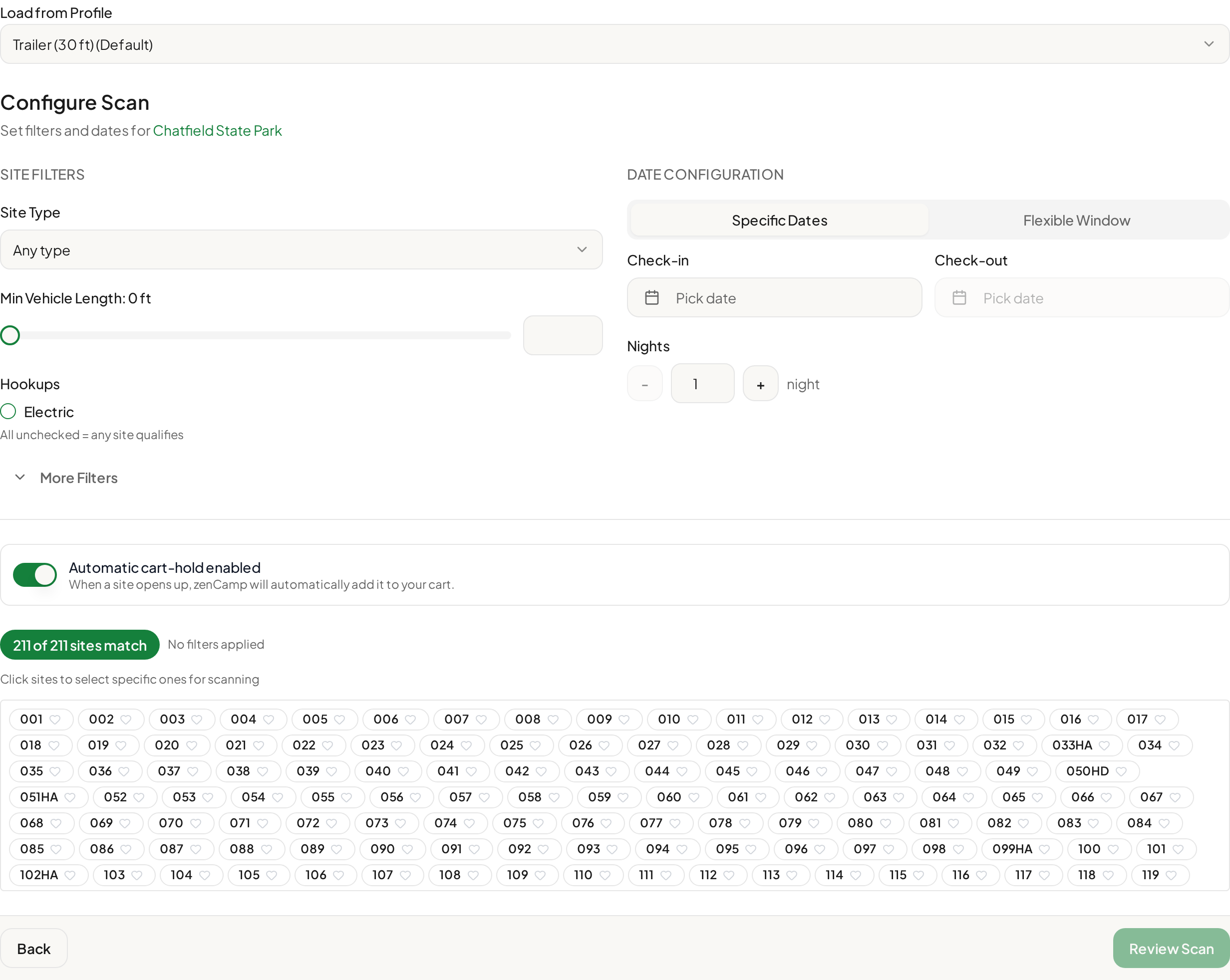
While you build a scan, the panel shows how many sites at that campground currently match what you've asked for, out of how many exist. Not an estimate. A count against our cached catalog of that campground's sites.
Start with nothing set, and every site is in play:
 Full size(opens in a new tab)
Two hundred eleven sites. Now ask for something specific. A 35-foot minimum vehicle length, and D Loop, which the note on this saved campground says backs onto the reservoir:
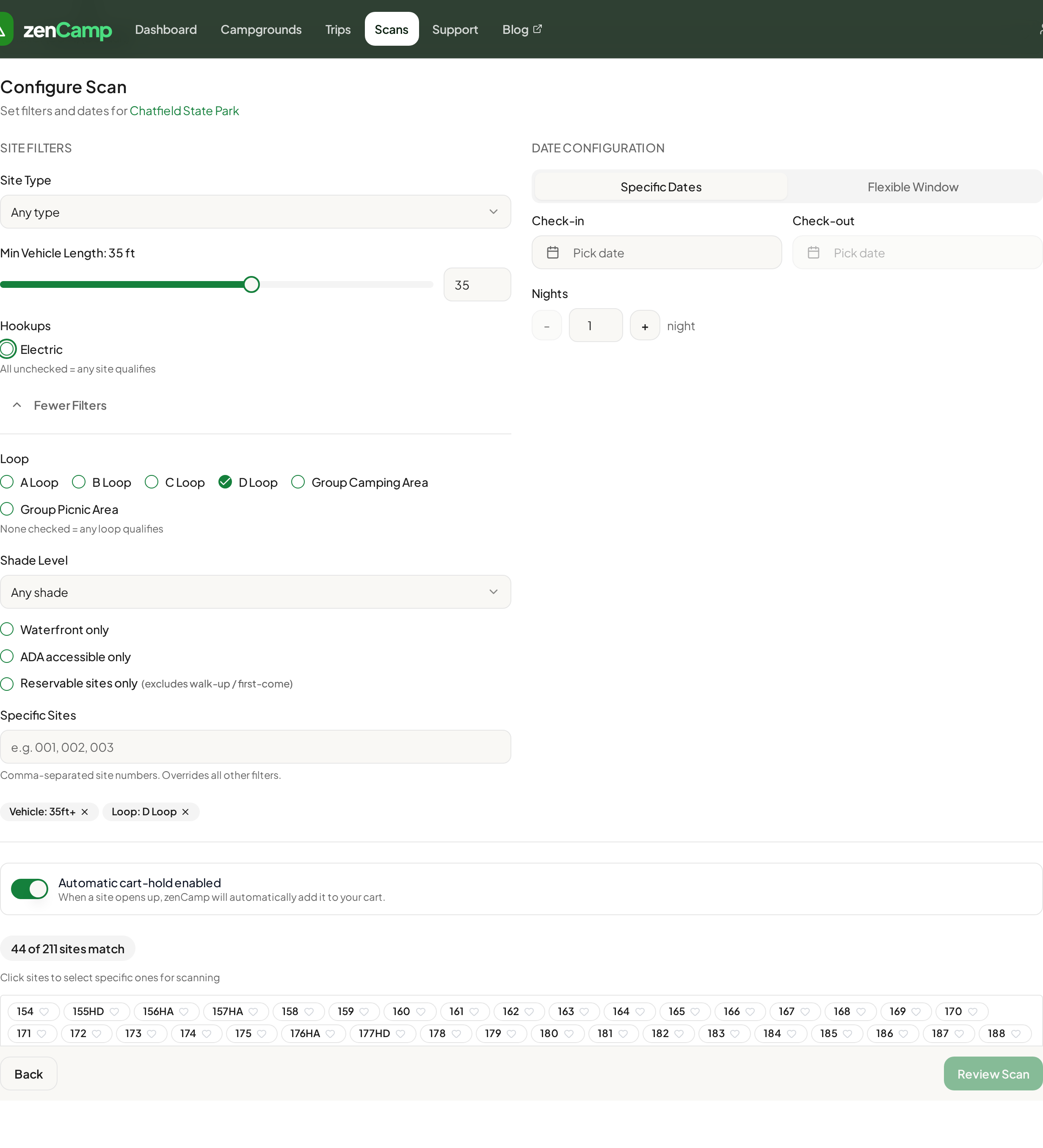 Full size(opens in a new tab)
Forty-four. Two filters removed 167 sites.
That's not a problem in itself. Forty-four is a healthy number to be watching, and they're sites you'd actually be happy to get. The point is that you can see it happen. Add a shade preference, waterfront and accessibility on top, and you can watch the number walk down toward single digits and then toward zero. A scan matching zero sites is not a scan. No cancellation will ever reach you, because there is nothing for a cancellation to match.
Without that number, over-filtering is invisible. You'd set six sensible-sounding filters, wait three weeks, hear nothing, and conclude the tool doesn't work, when what actually happened is that you asked for a waterfront, accessible, 40-foot site in the smallest loop in the campground.
There's a second reason a filter can quietly match nothing, and it isn't your fault: the campground may not publish that attribute at all. Coverage varies sharply between parks and between reservation systems, and it varies attribute by attribute within a single campground. Chatfield, booked through ReserveAmerica, records a site type and a loop for all 211 of its sites, but a maximum vehicle length for 197 of them. Pawnee (opens in a new tab), in the Brainard Lake Recreation Area of the Arapaho and Roosevelt National Forests, lists 45 sites through Recreation.gov and publishes no hookup information for any of them (both checked 2026-08-30).
That's where the two policies above start to matter. At Pawnee, a hookup filter empties the campground: all 45 sites, and not one of them because the site is wrong for you.
This is the strongest argument for watching the count rather than trusting the filter. A number that moves when you expect it to is a filter doing what you think it's doing. A number that collapses to zero the moment you touch one control is telling you something about that campground's data, not about the campsites.
Fixed dates, or a window
Dates split into two modes, and picking the wrong one costs you more chances than any filter will.
Specific dates is what it sounds like: you want the 4th to the 6th, nothing else is useful, tell me if it opens.
A flexible window widens the check-in date forward (by three, seven, fourteen or thirty days) while keeping the length of stay fixed. Ask for two nights from 9 October with a seven-day window and you're watching every check-in from the 9th to the 16th. It's the right mode whenever the trip could move, because you're matching against many more opportunities for the same amount of watching.
There's a third setting people miss, and it's the one that turns a near-miss into a trip. Minimum nights to alert lets you ask for three nights but accept two. Without it, a cancellation that frees up two of your three nights is silently discarded as "not a match." With it, you hear about it and decide for yourself whether a shorter trip beats no trip.
Both modes show a plain-language summary before you commit: check-in window, check-out range, nights, and the minimum you'll be alerted on. Read it. It's the last chance to notice that the scan says something different from what you meant.
One thing a window won't change: a canceled site may not come back the instant someone gives it up. That's a scheduling rule rather than a fault in your scan, and it's worth understanding before you conclude nothing is being released. Why a sold-out campground still has empty sites covers the timing.
A matched site still has to be won
Everything above is about the scan asking the right question. None of it is about what happens the moment the answer is yes.
That's a separate problem, and a harder one. Recreation.gov says it plainly in its own Help Center: setting an alert "does not guarantee you a reservation," because "many people may have signed up for a similar alert". Their notification email even tells you how many other people received the same update1.
So a site opening up is not a site you have. It goes to whoever completes the cart step first. Matching is necessary; it isn't sufficient. We wrote about that distinction on its own, because it's the part most people get wrong about how these tools work: cart holds vs. availability alerts.
Worth saying plainly: if your dates are genuinely flexible, you're watching one or two campgrounds, and you're not chasing one specific site, Recreation.gov's free alert is enough, as long as you don't mind the race. It costs nothing and it filters. What it can't do is hold the site for you: the notification goes to everyone watching those dates at the same moment, and the site goes to whoever reaches a phone or a laptop first. The case for anything more starts there, and when you need a particular site, on dates that can't move, or you've run past those three alerts.
What to check before you save a scan
- Does the match count look like a number of sites you'd be happy with? Not zero, not all of them.
- Is the vehicle length your actual rig, rather than a profile default you never updated?
- Could the dates move? If so, use a window.
- Would a shorter stay still be worth having? If so, set the minimum nights below the full stay.
- Does the summary line describe the trip you meant?
Once one scan is right, the next problem is repetition, because a whole season of weekends is not one scan, it's eleven. Copying a working scan across a date range, and fixing all the copies at once when you get a filter wrong, is its own problem; that's the subject of the next post.
Sources
-
Recreation.gov Help Center, camping availability alerts (opens in a new tab), retrieved August 30, 2026. ↩ ↩2