Release day, without the alarm clock
zenCamp release scans are here! Pick a site and dates for next summer before they open for booking, and zenCamp tries for the site the moment they do.
Memorial Day weekend kicks off the summer camping season, and next year's season opens for booking over Thanksgiving week. At a campground with a six-month rolling window, a stay arriving Wednesday, May 26 (a few days before the holiday weekend) opens on Thursday, November 26: Thanksgiving Day. That's under two weeks away. The rest of summer follows close behind, with June, July and August arrivals opening through December, January and February.
That's the odd thing about summer camping: much of it gets decided in the off-season, while your gear is still in the garage. Each date opens for booking on its own release day, usually at a set time in the morning, and at popular campgrounds the best sites can be gone within minutes. So use the fall and winter downtime to get ready for those release days, and take some of the uncertainty out of next summer.
Release scans are here, on Recreation.gov and ReserveAmerica, and they're built for release day. They're the release-day tool we mentioned in our release-window post.
A cancellation scan watches dates that are already booked and waits for someone to change plans. A release scan is for dates nobody can book yet. You pick the site and the stay. zenCamp works out when those dates open, tries for the site at that moment, and holds the site for you if it gets there first.
What a release scan does
On release morning, the open sites go to whoever gets them into a cart first. Recreation.gov's advice for that morning is to set up your payment details ahead of time and be ready at the release, which for most campgrounds is "7am PT/8am MT/10am ET, but not always!"1. That works if you can be at a keyboard at that minute, for every release you care about.
A release scan does that part for you. Whether or not it gets the site, you hear about it by email, Telegram or push notification.
A release scan sits alongside the cancellation scans you may already use:
| Cancellation scan | Release scan | |
|---|---|---|
| Dates | Already open for booking, usually full | Not open for booking yet |
| What it watches for | A site that comes back when someone cancels | The moment the dates first open |
| Sites | Specific sites, or filters for rig, length and loop | One site per scan |
| Dates per scan | Fixed or flexible | Fixed |
| When it finds a site | With cart-hold on, held for you for about 30 minutes; otherwise an alert | Held for you, about 30 minutes |
When your dates open
On Recreation.gov, most campgrounds open six months ahead of the arrival date1, but not all: Yosemite Valley, for one, releases a month of dates at a time. A release scan goes by the arrival date you give it, so the start-midweek strategy works the same way here: pick an arrival date that opens before everyone else's weekend does.
On ReserveAmerica, each state sets its own rules, and they vary a lot more. How far ahead you can book ranges from four months in Massachusetts to nine in New York, eleven in New Hampshire and thirteen in Georgia. Utah counts its four months from your check-out date, not your arrival. Some parks give cabins or group sites a different window from their campsites. Release times vary by state too: Georgia opens new dates at 8 AM Eastern on weekdays, Oregon at 6 AM Pacific, and a few states an hour later on weekends. New Mexico and Colorado release at midnight.
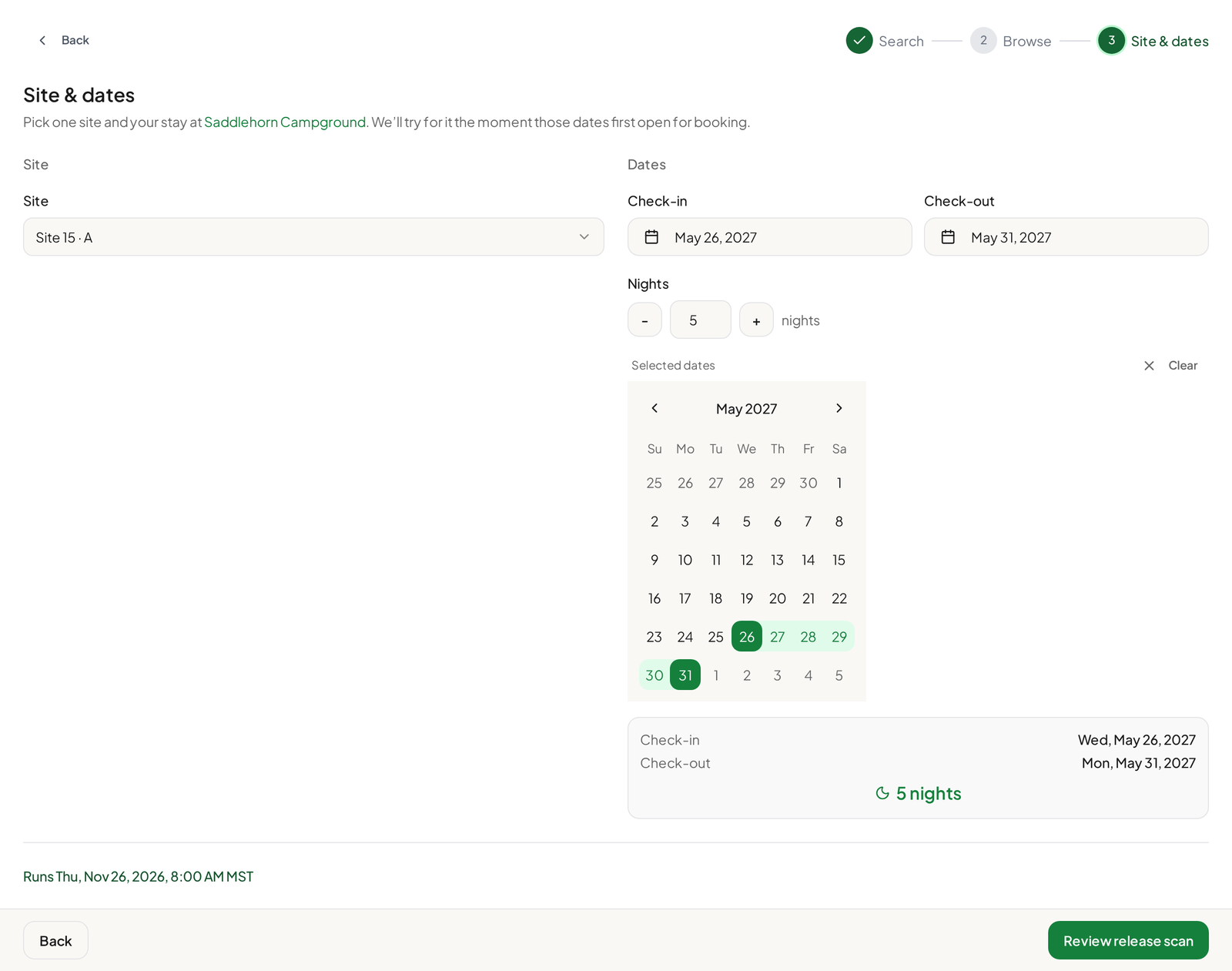
You don't have to keep track of any of that. zenCamp works out the release time for the campground, site and dates you pick, and shows it before you schedule anything. If a campground releases by lottery or early access, or hasn't published its next release, zenCamp tells you instead of scheduling a scan.
 Full size(opens in a new tab)
A midnight release doesn't have to mean a midnight alarm. When a release falls between 9 PM and 7 AM your time, you can have zenCamp try at a later time instead, such as 6 AM. It's your call, and zenCamp makes you confirm the trade-off first: "The site may already be booked by then."
Setting one up
Before you start, link your account. Like cart-hold on a cancellation scan, a release scan holds the site in your own Recreation.gov or ReserveAmerica account, so it needs a linked login that zenCamp has verified.
 Full size(opens in a new tab)
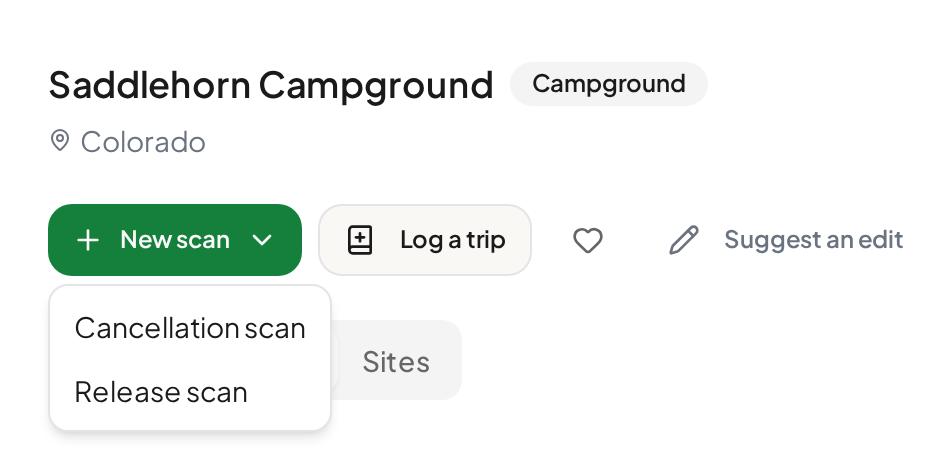
- Start a release scan. Choose New scan, then Release scan, on your scans page or a campground's page, or use Set up a release scan beside a campground's next release. If you start a cancellation scan for dates that haven't opened yet, zenCamp points you to a release scan instead.
- Pick the campground, the site and your stay. One site, fixed arrival and departure dates.
- Check the release time. zenCamp shows when the scan will run. Once it's scheduled, your scans page also shows where that time came from, such as Recreation.gov's booking window or the state's release time.
- Review and schedule. The scan shows as Scheduled under the Release scans tab on your scans page.
Backup sites
On release morning it pays to have backups picked in advance, so you don't lose time picking another site when your first choice is gone. With release scans, you set one up for each. A backup doesn't have to be at the same campground or for the same stay: it can be a different site, a different campground, or different dates, as long as it opens at the same release as your first choice.
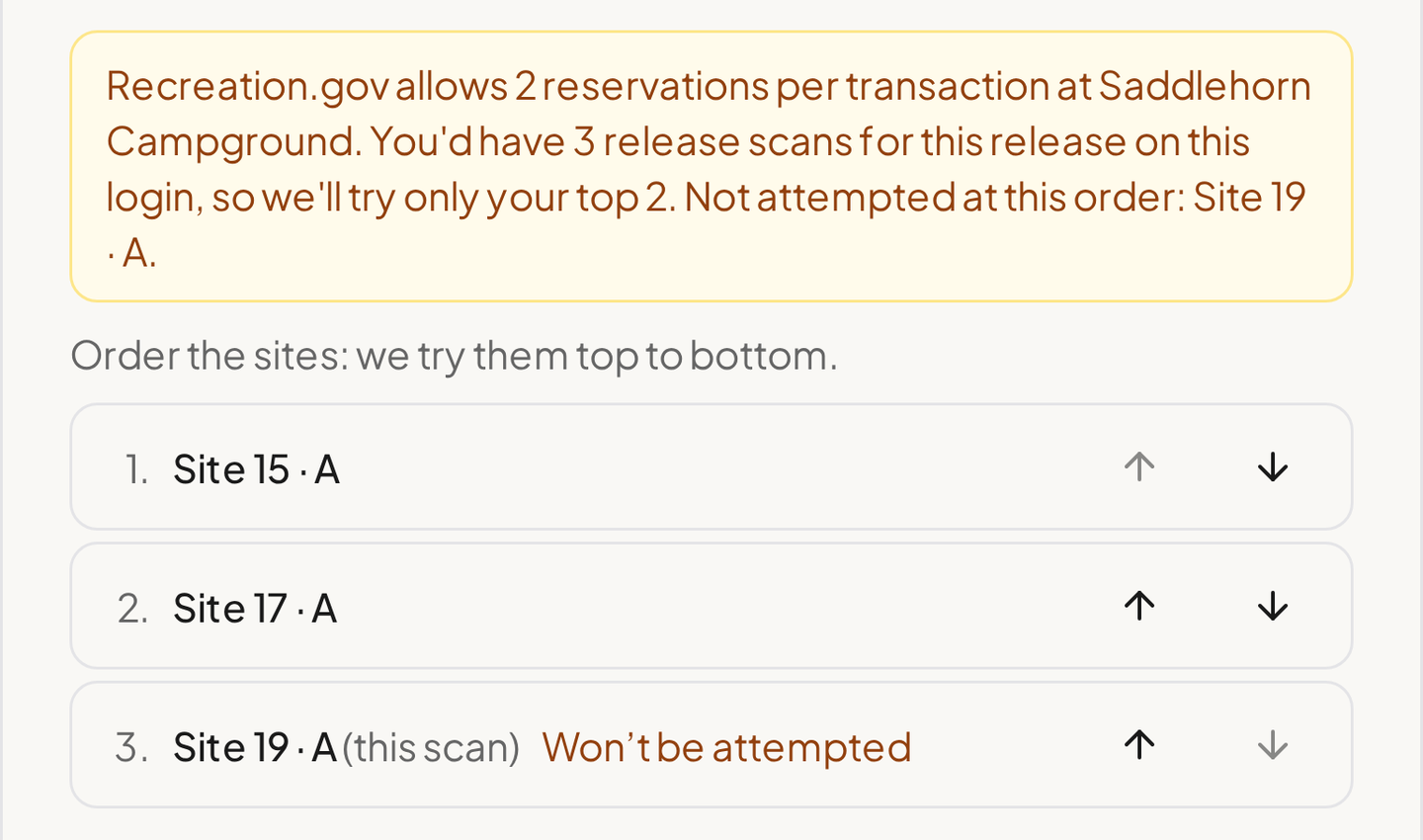
Recreation.gov limits how many sites you can reserve in one transaction at each campground. If your release scans at one campground for the same release add up to more than that, zenCamp tells you and asks you to rank them: "Order the sites: we try them top to bottom." Any past the limit are marked "Won't be attempted", so you can see before the morning which ones are in play. On ReserveAmerica there's no limit to rank against, so every release scan you set up is tried. Every release scan within the limit is tried at the release, so more than one can land. Book the one you want, and let the others' holds run out.
 Full size(opens in a new tab)
Changing your mind
You can change the site or dates until 12 hours before the scan runs (the release time, or the later time you picked). You can cancel it until about 90 seconds before. After that, it can't be cancelled.
Before release morning
Watch for the login check. The day before the release, zenCamp checks that it can still sign in to your account. If it can't, you get a notice asking you to fix the login or switch accounts before changes close, 12 hours before the scan runs. If it still can't sign in at the release, it doesn't try, and you get a notice saying why.
Expect reminders on the day. One arrives about 90 minutes before the scan runs (the release time, or the later time you picked) and one 10 minutes before, so you know to be near your phone when the hold might land. If the scan runs between 9 PM and 7 AM your time, zenCamp also flags it when you set the scan up and reminds you the evening before, because a hold is only useful if you're awake to check out.
On Recreation.gov, stay off your account during the release minute, on the website and the app. Recreation.gov's own release-day advice is not to log in to "multiple browsers, multiple tabs, or multiple windows using the same account"1. Clicking around on the same account at the release competes with your own scan.
On ReserveAmerica, it's the opposite: be signed in and ready. Sign in to ReserveAmerica on the account the scan uses before the release, so you're ready to book as soon as zenCamp gets the site.
When it gets the site
What happens next depends on the platform.
On Recreation.gov, the site is in your own Recreation.gov cart. Recreation.gov locks a site in your cart for 15 minutes1, and zenCamp extends that once, to about 30 minutes in total. Sign in to Recreation.gov and check out before the timer runs out. The site isn't booked until you do.
On ReserveAmerica, zenCamp holds the site for about 30 minutes in total, and while it's held, it's locked for everyone, you included. It won't show in your cart yet. When you're ready to book, and before the hold runs out, make sure you're signed in to ReserveAmerica, then tap I'm Ready on the scan's page or in the hold notice. The site comes back within seconds and is open to everyone for a short window, so add it to your cart and book it right away. If ReserveAmerica still shows the site as unavailable, refresh the page: a page you opened before tapping I'm Ready won't update on its own.
Either way, nothing is charged and nothing is reserved until you complete the booking. You look at the site, and you decide. More on why a hold beats an alert in cart holds vs. availability alerts.
When it doesn't
Some release mornings won't go your way. A holiday weekend at a famous campground has more people who want it than it has sites, and no tool changes that. When a release scan doesn't get the site, the notice says so plainly. If a miss is our fault, it says that too.
Release day is the best chance for a peak date, but it isn't the last one. People who booked on release morning cancel later, often close to the date, because at most Recreation.gov campgrounds a late cancellation costs no more than an early one until the day before arrival2. So a lost release is a good moment to switch to a cancellation scan for the same site and dates, and it only takes a few steps. Choose New scan, then Cancellation scan, on the campground's page and pick the same site and stay. zenCamp starts watching for someone to cancel. If you'd picked a later time to try and the site was gone by then, it's even quicker: the notice links straight to that cancellation scan, already filled in, and you just confirm it.
Release scans are in beta
Release scans are ready for next summer's releases. While they're in beta, here's what they cover:
- Recreation.gov and ReserveAmerica only, the same platforms zenCamp scans for cancellations.
- One site and fixed dates per scan. Flexible date windows and filters stay with cancellation scans.
- No lottery or early-access campgrounds yet. If a campground releases that way, zenCamp says so instead of scheduling a scan.
- zenCamp has to know when your dates open. If a campground hasn't published its next release, or zenCamp doesn't have its release time yet, it tells you instead of scheduling a scan.
- Dates that are already open need a cancellation scan, and zenCamp offers to start one.
If a release time looks wrong, or you have anything else to tell us about release scans, good or bad, write to [email protected] (opens in a new tab). We're a small team and we read every message.
If Memorial Day 2027 is the trip
Choose the arrival date first: a midweek start can put you ahead of everyone aiming for the Friday. With a release scan, the rest is short. Link your account, pick the site and your backups, and set the scans up at least 12 hours before your dates open. For a 10 AM ET release, that means by 10 PM ET the night before. Then, on release morning, keep your phone nearby.
Sources
-
Recreation.gov, "Tips for making campsite reservations at popular locations" (opens in a new tab), retrieved October 5, 2026. ↩ ↩2 ↩3 ↩4
-
Recreation.gov Rules and Reservation Policies (opens in a new tab), retrieved October 5, 2026. ↩